I led this AI product re-design for Vpin — an AI-powered video learning platform that transforms passive video watching into a searchable, citable and editable video knowledge base. The challenge wasn't building a better video learning player. It was inventing and optimizing how people can be more efficiently grab the knowledge from tons of videos online where they don’t have enough time to cosume. I’m incredibly grateful for the opportunity to design something entirely challenging especially in this competitive market. It was a chance to explore the patterns of how people plan and learn powered by AI, and I was fortunate to collaborate with the great team, where it not only keeps day-to-day product operations running smoothly, but also drives innovation through new initiatives and development..
architecture of Exploration design
Baseline
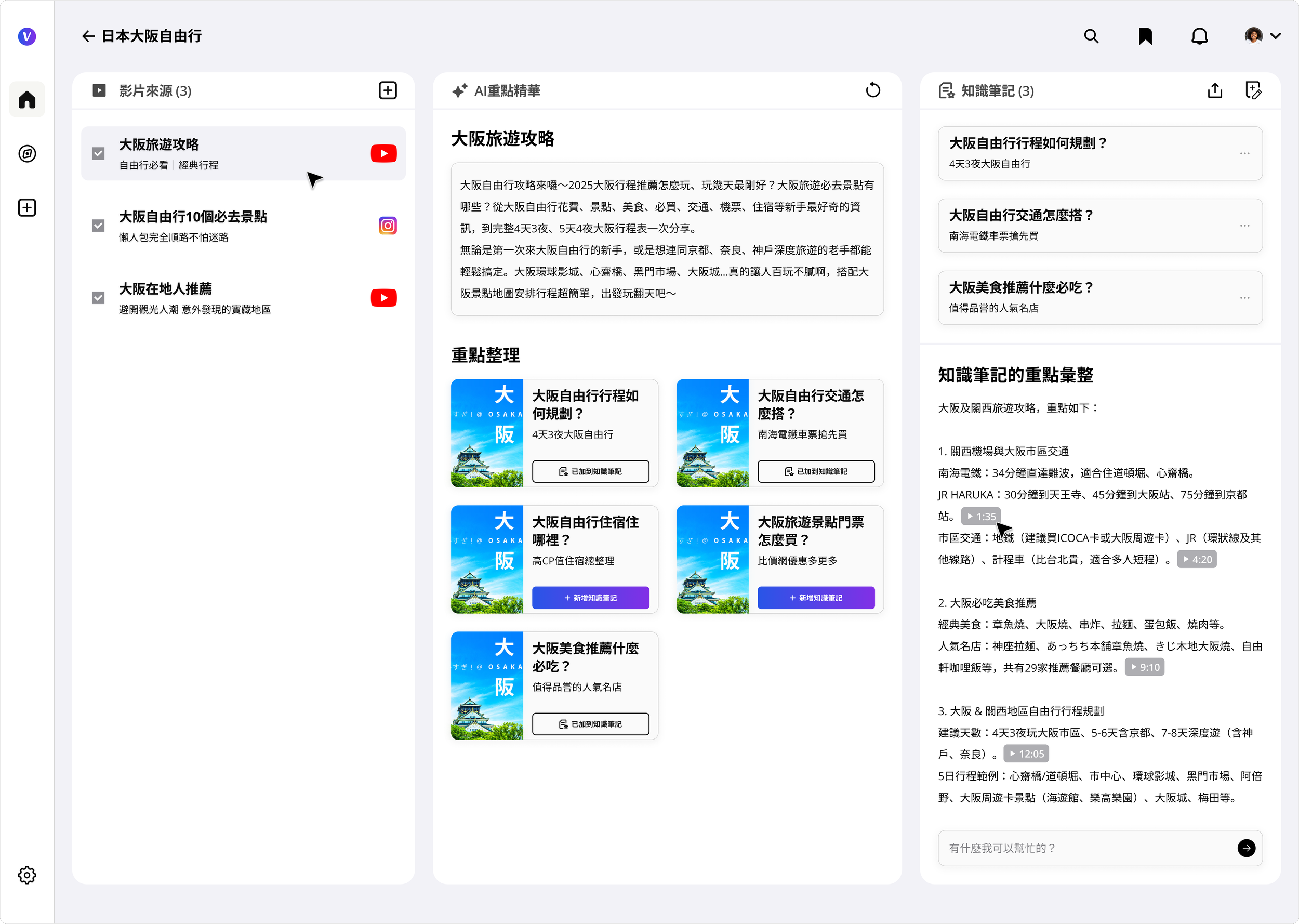
V2.0 Home design_draft_PC web
Vpin transforms any video URL into a structured, queryable knowledge package. Users pin videos from YouTube, TikTok, or any video platform — the AI layer extracts summaries, chapters, transcripts, and timestamps, turning passive watching into an active, searchable knowledge base.
One of our visions is to become the bilingual AI video search and certified knowledge library — where learners master 50 minutes of content in 5, and creators' knowledge becomes findable and monetizable.
Design evolution
Paradigms shift before discovering solutions
In the early design of the AI-powered multimedia learning platform, I broke down the learning workflow into three key stages: sourcing video and audio content, extracting key insights, and transforming them into reusable knowledge notes.
This framework was built with knowledge-driven professionals in mind—such as market researchers and media analysts—who need to process large volumes of multimedia content and uncover meaningful patterns or narratives. At the same time, the platform also supports content creators by providing tools to repurpose their own materials, enabling them to craft richer, more engaging content for their audiences.
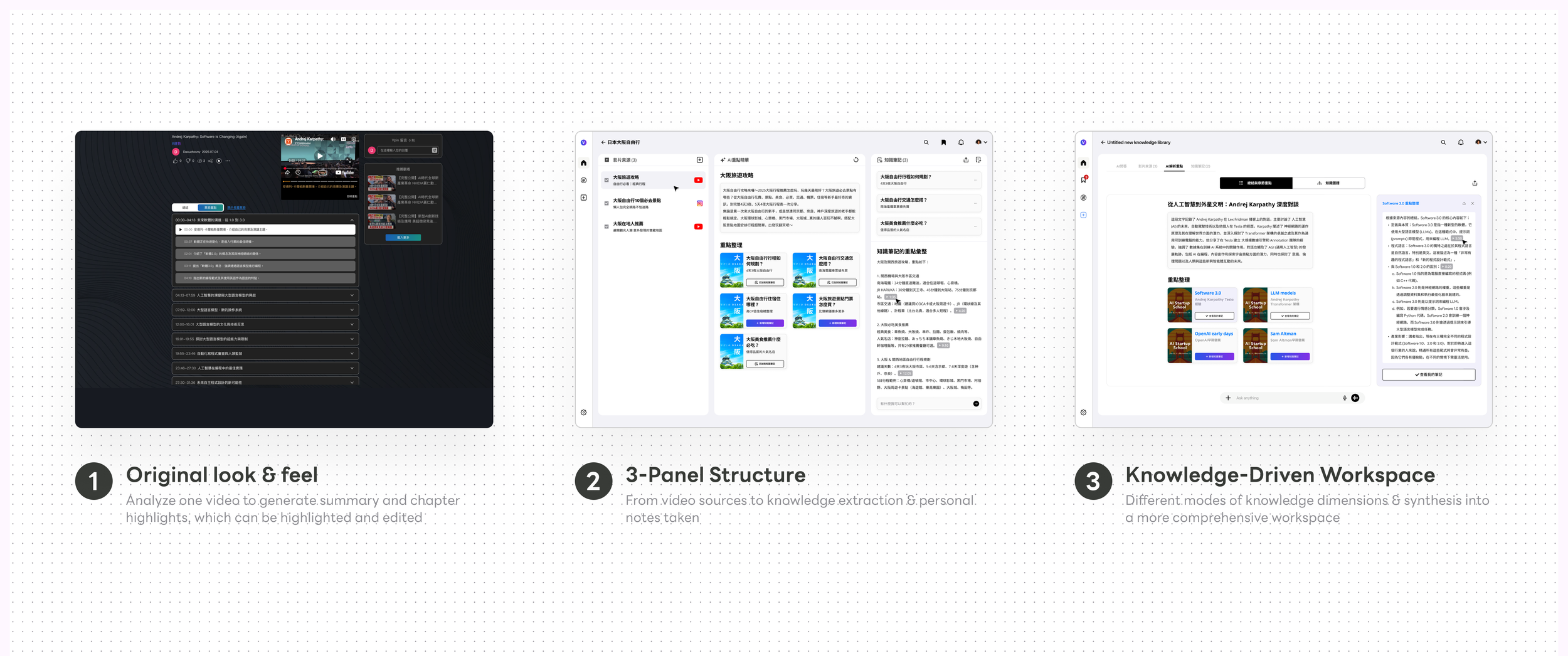
This thinking initially evolved into a three-panel interface, each panel corresponding to a stage in the multimedia learning journey. It provided a clear, structured way to guide users from content collection to insight extraction and ultimately to knowledge creation.
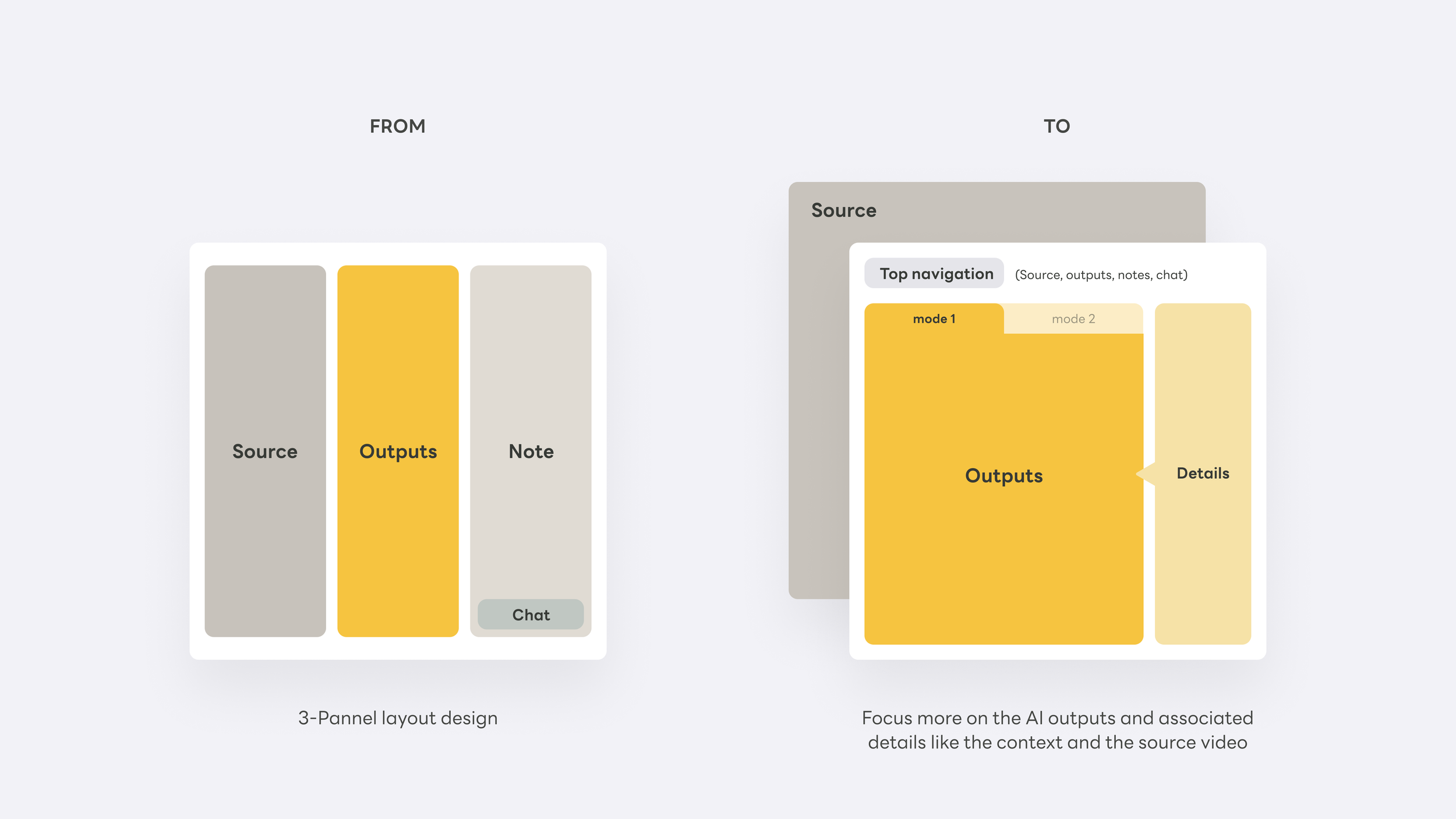
However, as we dug deeper into how users actually move forward with the extracted insights—especially when engaging with the more critical, downstream features—the three-panel layout began to feel restrictive. Once users confirm a source video as their knowledge base, their focus naturally shifts. At that point, the interface needs to transition as well—reorienting the experience around knowledge extraction and presentation as the primary task, rather than maintaining equal emphasis across all three stages.
problems: knowledge locked in video
Video is the richest learning medium humans have ever built — but it's a black box. You can't skim it, cite it, search it, or build on it. Once a video is watched, the knowledge inside it effectively disappears. We called this "knowledge locked in video."
User research surfaced this pain across very different users — all stuck at the same wall:
Enterprise
"I want to organize our internal training videos into course modules so employees can quickly find clips relevant to their specific tasks."
Consultants
"I need to extract key points from multiple project recording videos and generate a clear knowledge structure to share with clients."
Creators
"I want to pull from multiple videos, deduplicate, and organize — so my audience can absorb the knowledge without watching everything themselves."
Planners
"I want to collect location info from travel videos across platforms and combine it with other sources to build a trip itinerary."
The gap was consistent across all four: videos were scattered across YouTube, Instagram, TikTok — no unified management, no deduplication, no structured extraction. Existing tools were either single-platform, single-use AI wrappers, or browser plugins that processed one video at a time. None invested in building a cross-source knowledge layer.
The real design question wasn't "how do we organize videos?" It was: "how do we turn a collection of videos into a knowledge structure users can actually think with?" That reframe changed the architecture, the empty states, and the entire onboarding flow.
Mental model
Video Source → AI Knowledge Layer → Searchable Output
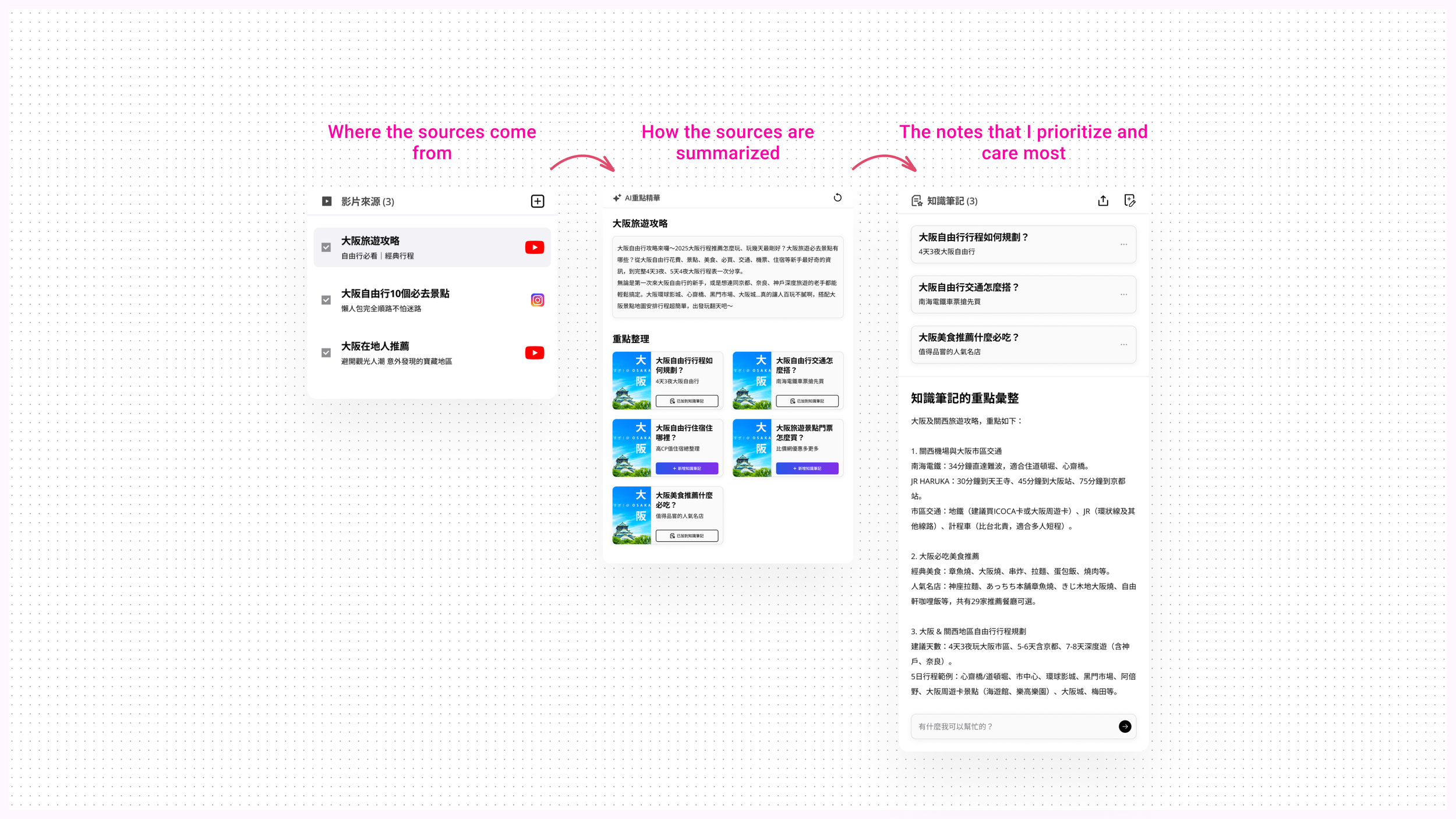
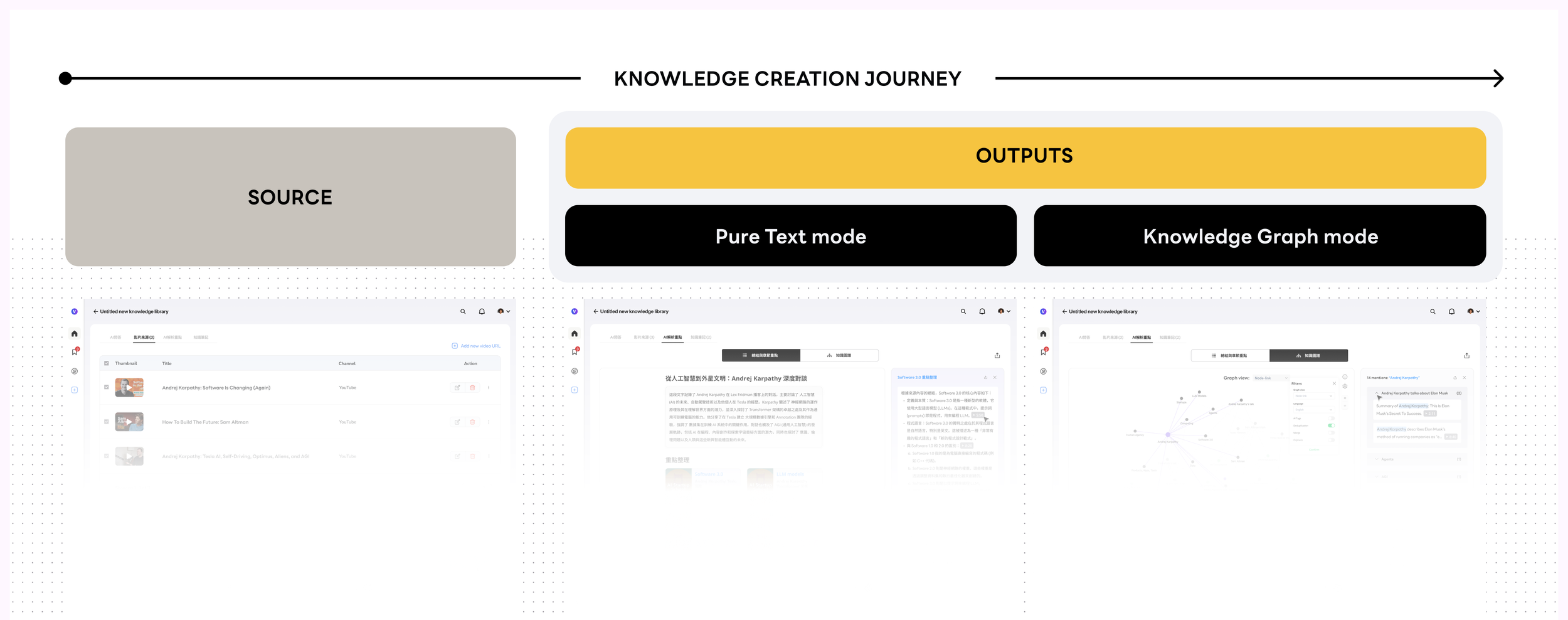
The mental model is built around a three-stage creation journey — mirroring how knowledge workers actually think, not how file systems are organized. Each video isn't stored; it's transformed. Users can get a one-paragraph summary, read an AI-enhanced transcript, jump to timestamped chapters, or ask the video a direct question and receive a cited, sourced answer.
This maps directly to how the product roadmap was sequenced — each stage builds on the previous one, and the visual system had to support all four states as depth tiers within a single knowledge package:
One-page summary→Knowledge graph→Personal knowledge base→AI Q&A
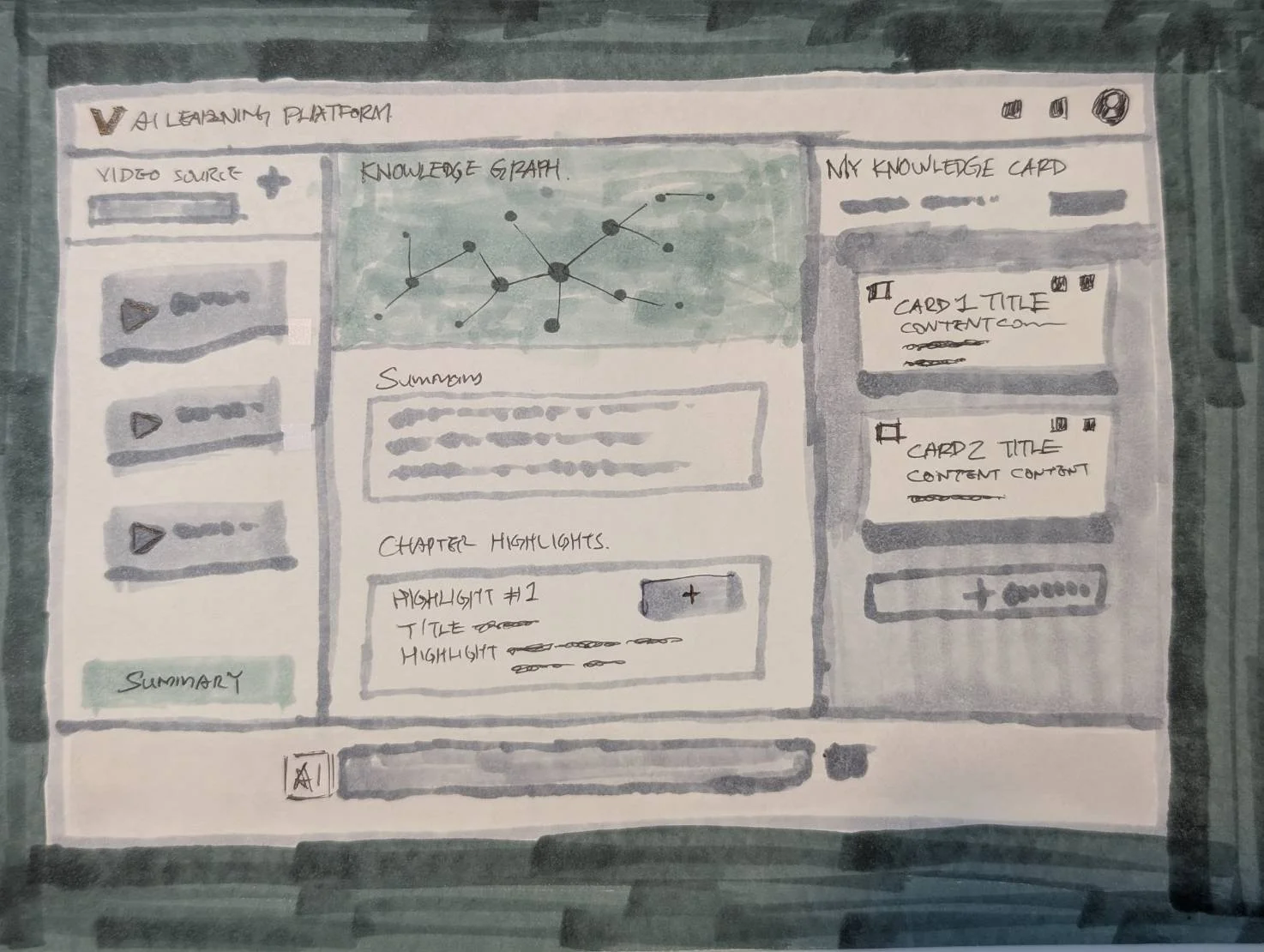
Early Sketch
This early-stage concept illustrates a three-phase interface designed to align with users’ mental models and intentions. It maps out how the experience progressively understands, interprets, and responds to user needs through each stage of interaction. Whatever it is, the way you tell your story online can make all the difference.
The core idea behind this diagram is rethinking how knowledge is structured and presented—shifting from linear text to a more multidimensional representation of the knowledge space. By visualizing relationships, it becomes easier to reveal how different nodes connect, as well as their hierarchies and dependencies. Compared to text alone, this approach more intuitively captures the underlying structure and interplay between concepts.
design solution
From Insight to Source in One Click
It's rare to design an AI product where the core structural decision is also the core UX decision. For Vpin, it was this: should the system ask users to manage three things simultaneously, or guide them through focused stages? The three-panel layout felt logical in wireframes — but once users confirmed their source videos, their entire attention shifted to knowledge extraction. The interface needed to shift with them.
The answer was stage-based navigation: the focused views with each representing a depth tier in the knowledge journey, and AI chat persistent throughout. The layout doesn't just accommodate complexity — it resolves it by surfacing exactly what matters at each stage, which leads to the second critical design decision: who is responsible for organizing knowledge — the user, or the system? Should we seperate them or integrate? Let me walk you through step by step next.
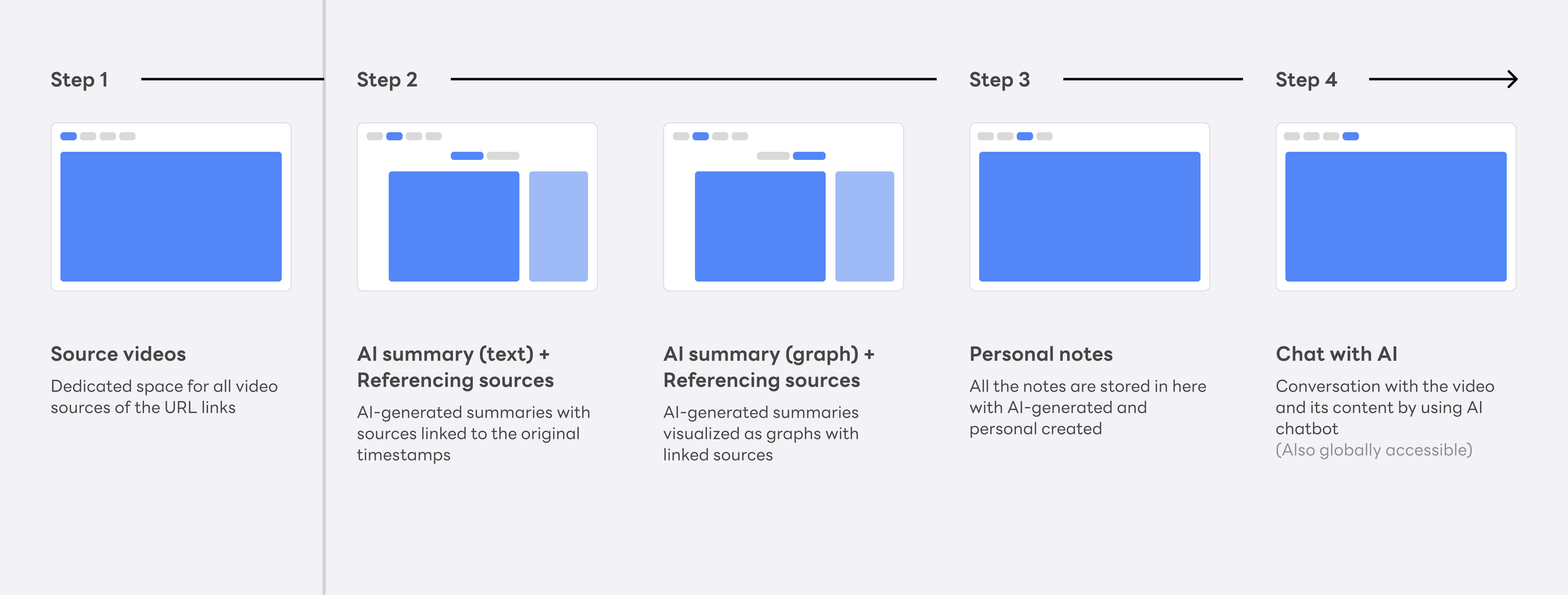
Andrej Karpathy's LLM knowledge base methodology has three tiers: a raw/ directory of source documents, a wiki compiled and maintained entirely by the LLM — summaries, chapters, concept articles — and an output layer where the user generates, saves, and files back what matters.
Vpin's architecture maps to the same three tiers, almost accidentally. Video Source is raw/ — a dedicated space to collect input material. AI-generated chapters and highlights are the wiki — structured by the system, never written by hand, always traceable to the original. Personal Notes are the output — where users save what resonates from AI highlights, or layer in their own thinking on top.
Each view is a tab, not a separate product — users move between them freely. The pipeline is there — raw source, compiled knowledge, personal output — but users never see it named. They just move forward.
How each layer works
Video Source space
raw/ — A dedicated space for source material. Users collect video URLs here; the system does nothing until the user is ready. All complexity begins after this step.
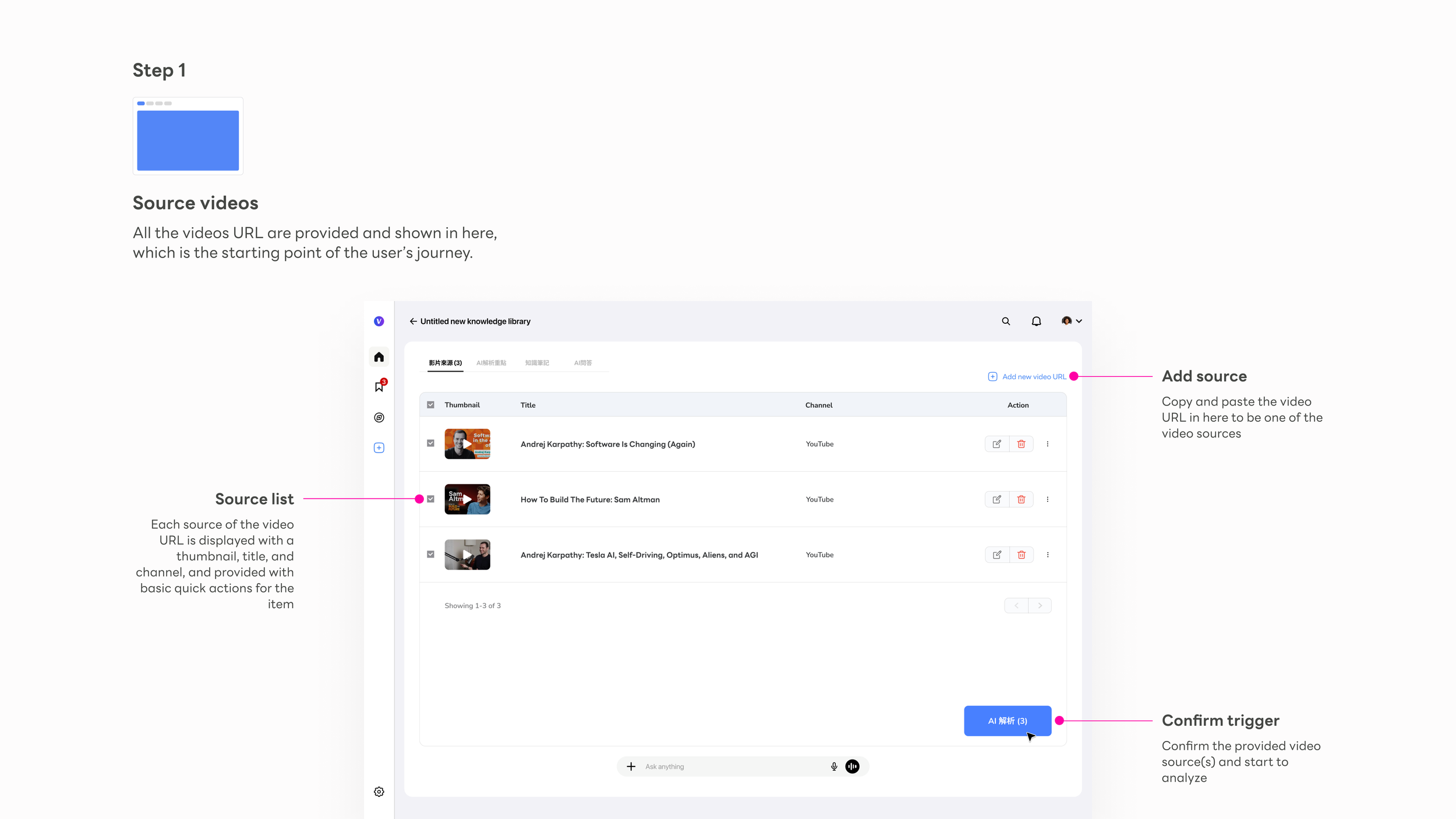
Add source
The primary action is a URL paste field — no setup, no friction before the user can begin. The empty state carries the full onboarding weight.
Source list
Each video shows thumbnail, title, and channel — instantly recognizable. The list is the user's working set, not a library to browse.
Confirm trigger
"AI 解析" is the gateway action. Surfacing the count makes the user's intent explicit before committing to processing — a small moment that prevents regret.
AI Knowledge Points
wiki/ — AI-authored chapters, highlights, and cross-source summaries. The system writes this entirely; the user never does. This is where raw video becomes structured, navigable knowledge.
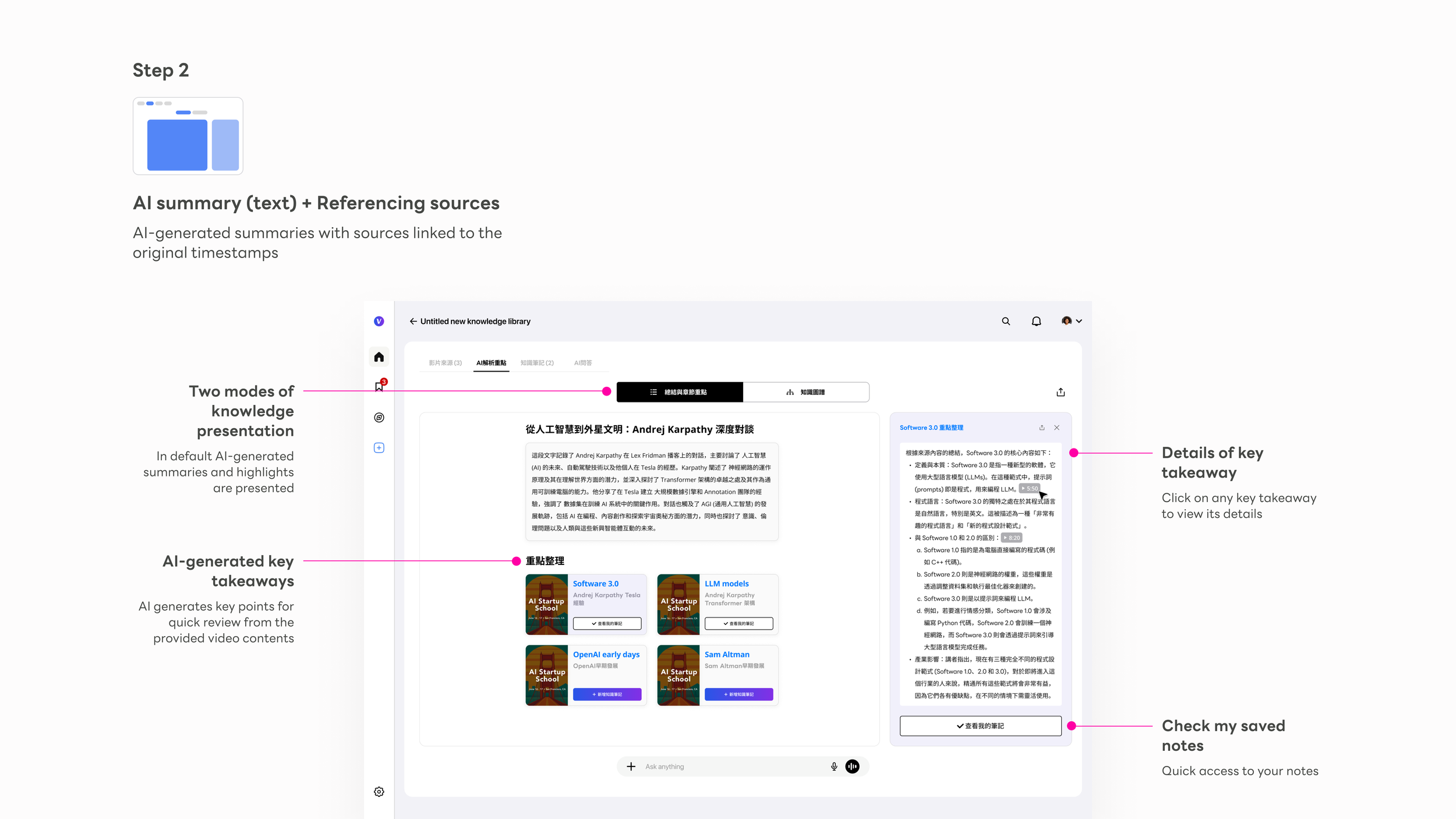
Mode toggle
Text summary and Knowledge Graph are one click apart, always visible. Users learn that two modes exist before they need to choose between them.
AI summary block
A cross-video synthesis at the top — the AI's reading of the entire knowledge package before users dive into individual cards.
Key point cards
Each card ties to a source video with thumbnail. Clicking opens a right-side detail panel without leaving the main view — depth on demand.
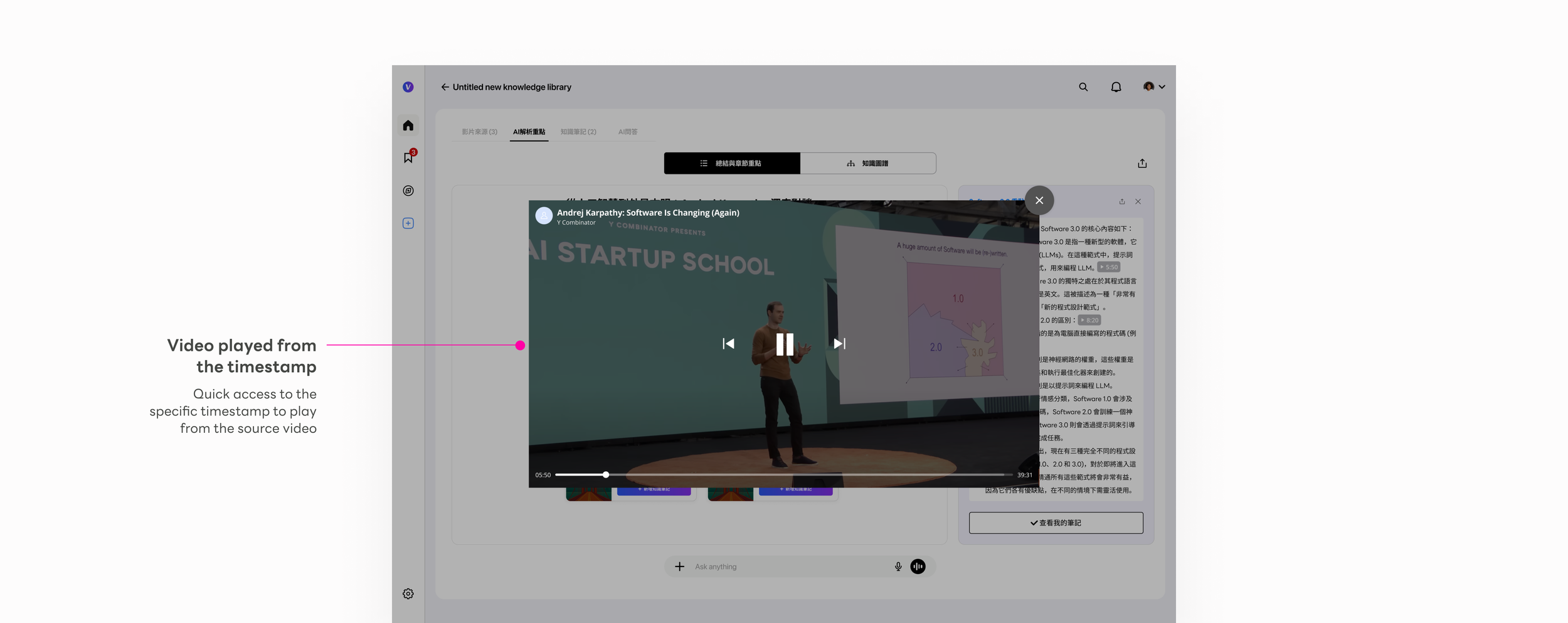
Source citation badge
Every AI insight traces back to a specific video and timestamp. The badge is a trust primitive — tapping it plays the exact source clip inline.
Knowledge Notes
output/ — Where the user's knowledge takes shape. Save from AI highlights, or write from scratch. These notes are the user's own artifact — filed back into the knowledge base and owned by them.
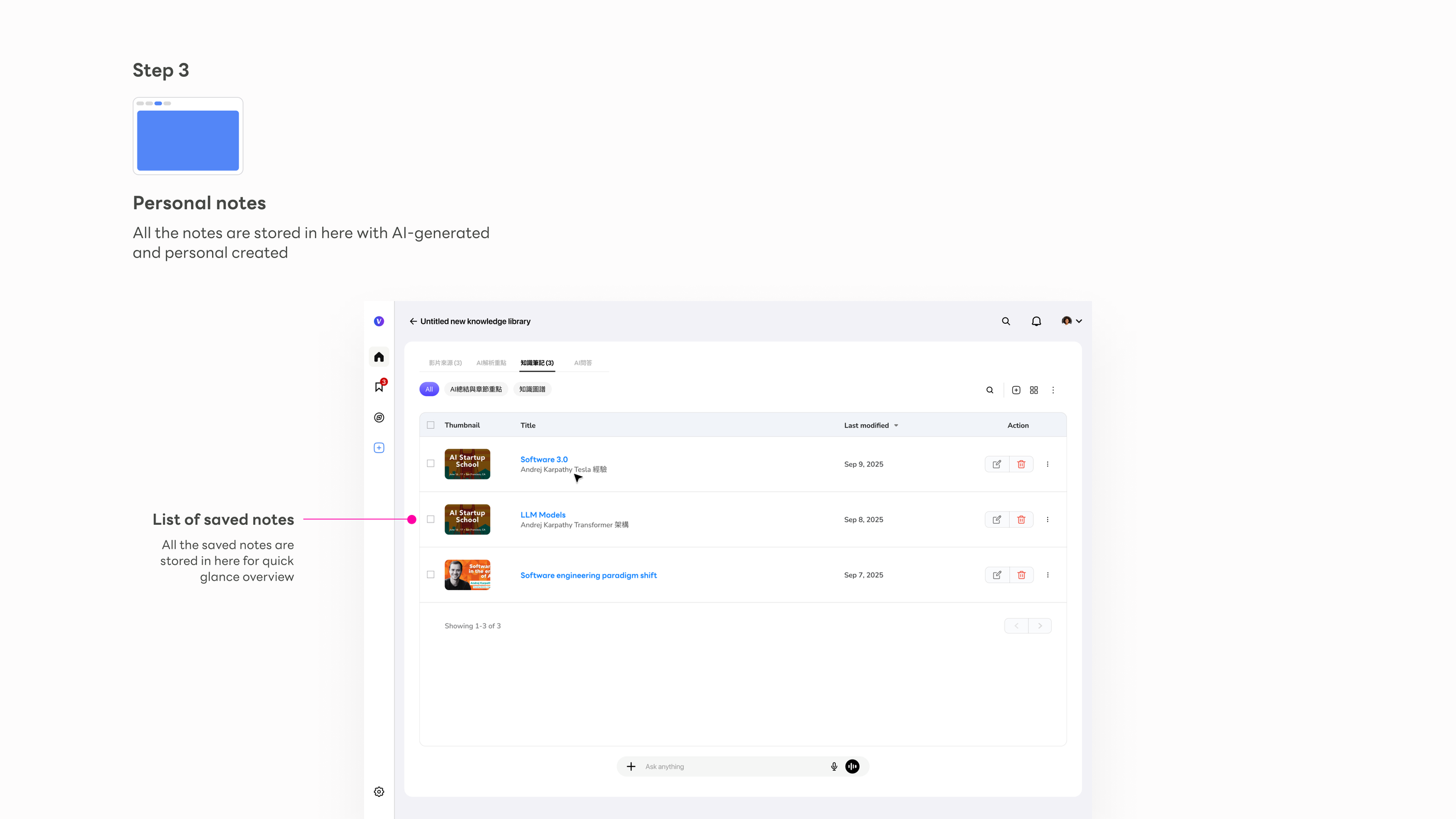
Notes list
Each note is titled by AI from its content — never "Untitled" — making the library immediately scannable and usable from day one.
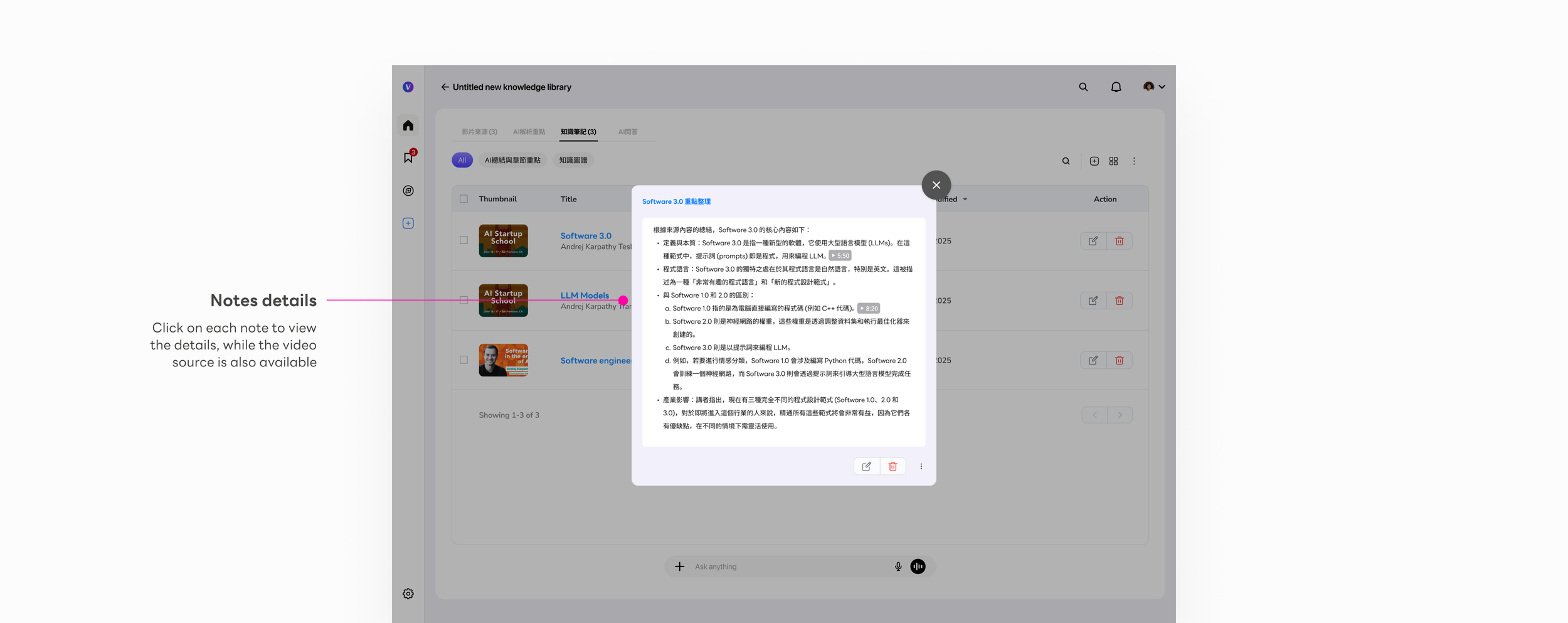
Note detail modal
Full AI-structured content: key arguments, definitions, examples — formatted for reuse. Editable so users can refine the output into their own voice.
Source traceability
Each note links back to its source videos. The knowledge chain from original video to final artifact stays intact and verifiable.
AI Chat
A persistent thinking partner across all three tiers. Ask anything against the compiled knowledge base — answers grounded back to the original source video.
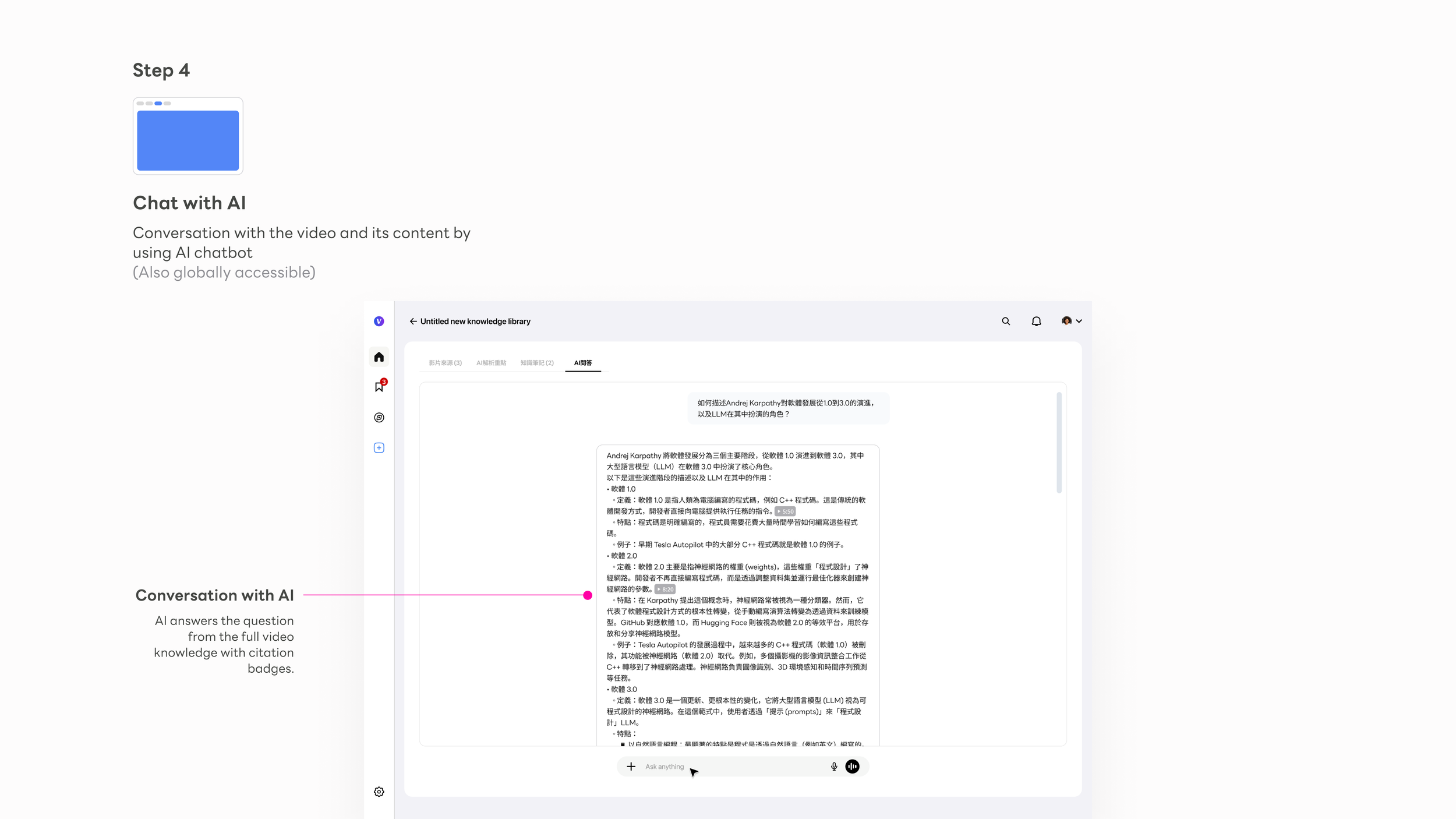
Persistent bar
The chat input sits at the bottom of every tab — users never navigate away from their current context to ask a question. The AI is ambient, not a destination.
Cross-video synthesis
Answers draw from the full knowledge package, not just the visible video. The AI reasons across all sources automatically — no manual selection required.
Source-grounded answers
Every response carries citation badges. The same trust architecture powering the Knowledge Points view extends into the chat — consistency by design.
Signature feature
The Knowledge Graph — making implicit connections explicit
"What connects these ideas across all my videos?"
"How does Software 1.0 relate to what Karpathy said about LLMs?"
"Show me the relationships — not just the summaries."
The Knowledge Graph is the most novel interaction Vpin introduced — nothing like it existed in the tools we could reference. In Karpathy's knowledge base methodology, the compiled wiki contains concept articles and backlinks — each concept documented, every connection between them tracked. The Knowledge Graph is that same structure made visual: nodes are concept articles, edges are backlinks, and the right-side panel is the article itself. The design challenge wasn't building a graph visualization. It was making that structure feel navigable and trustworthy on first use, without any explanation.
I applied two distinct graph modes, each built for a different kind of reasoning:
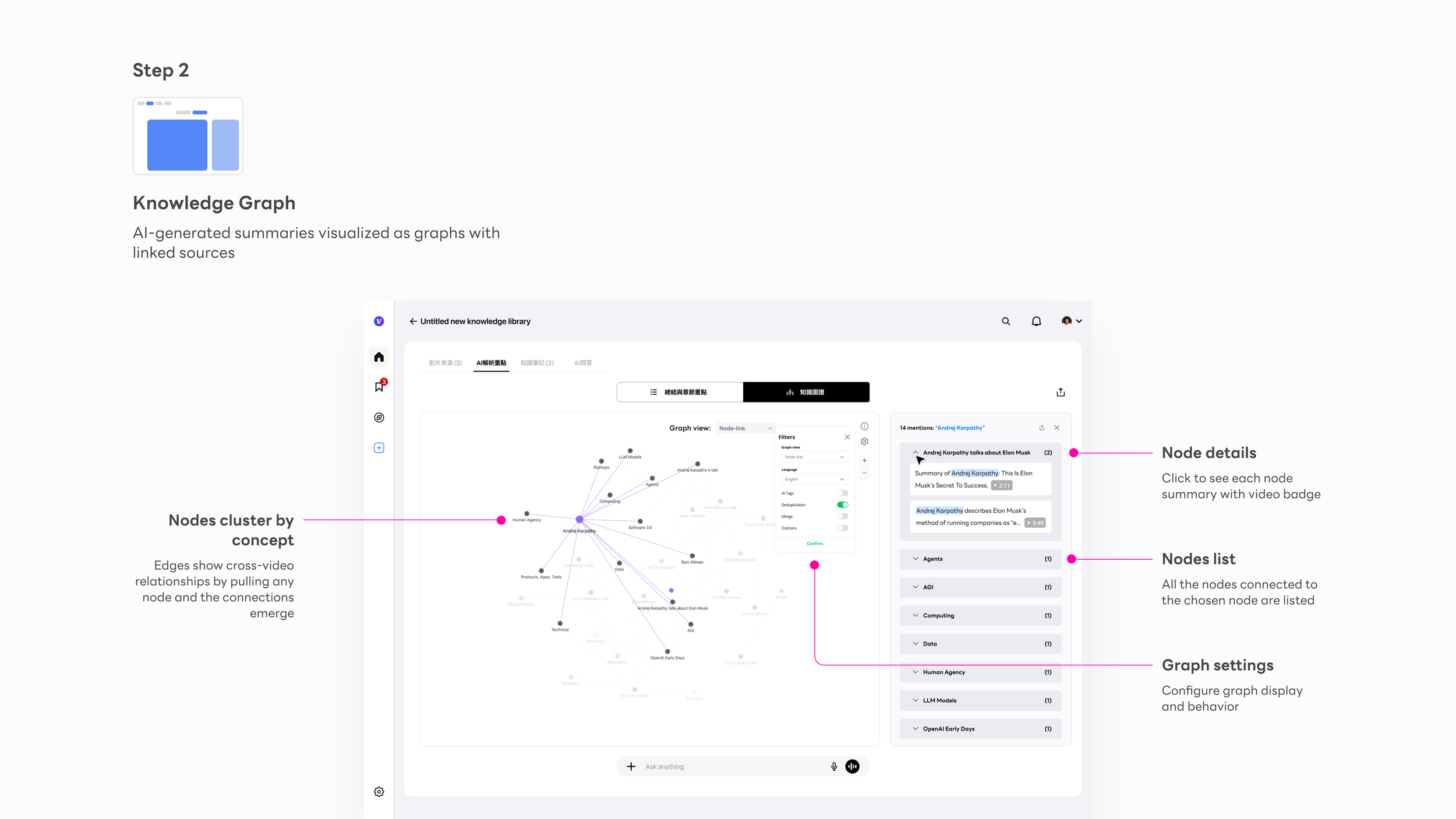
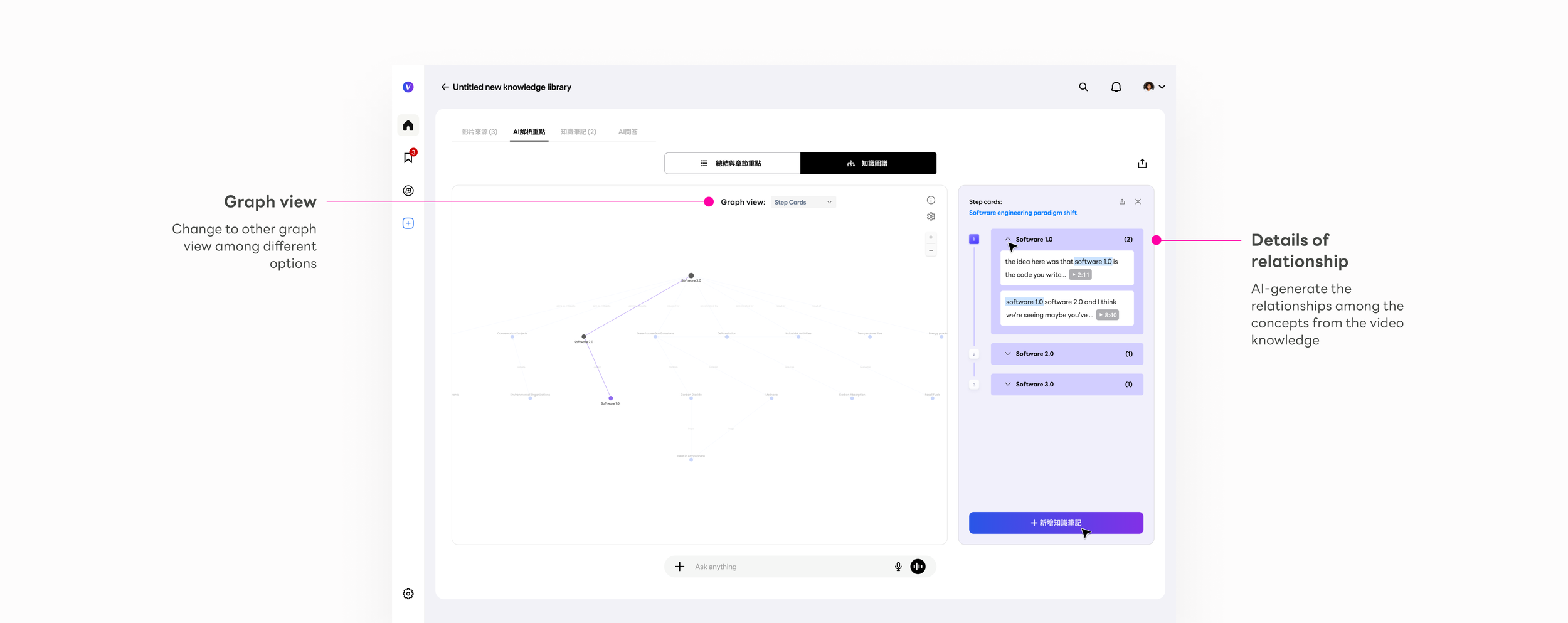
The right-side panel was the design decision that made the graph trustworthy. In early testing, users found the graph compelling but hesitated to act on it — the connections felt like AI assertions, not verified facts. The source citation panel changed that: clicking any node reveals every video that mentions that concept, with the exact timestamp. That created a loop: Node → Right panel → Source citation → Video timestamp → Back to graph
This loop made the graph actionable, not just visual. Users stopped treating it as a visualization and started treating it as a navigation surface — a way to move through knowledge, not just see it. The shift from observer to navigator was the design outcome I was most proud of on this project.
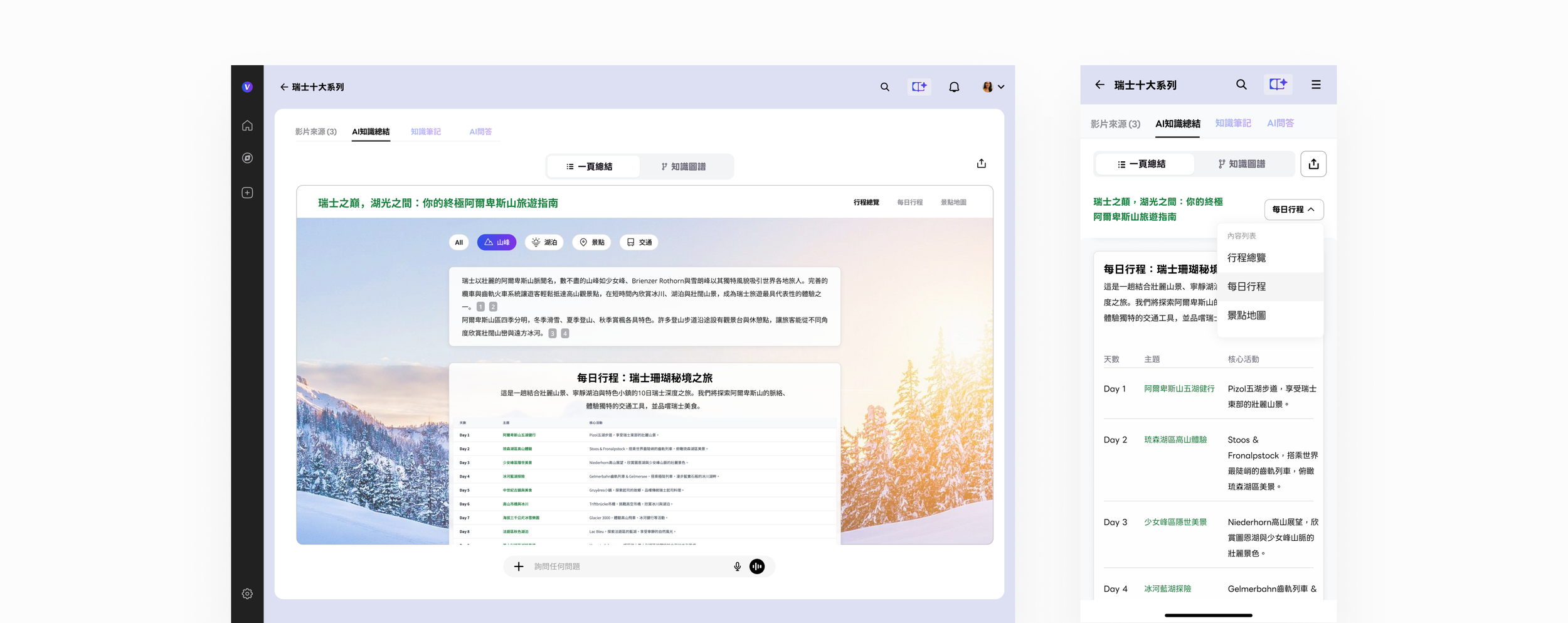
1-Page AI Travel Book
We extend and apply this knowledge framework concept for the travel planning, where people collect all the videos of the destination, and paste the URL links in Vpin, and we do the rest of the works, including attractions summary, daily tour plan, and pin the locations on the map, available on web and mobile versions.
Key takeaways
What building a new AI knowledge category taught me
1.
Focused stages beat simultaneous panels
The shift from equal-weight panels to stage-based navigation was validated in the first round of testing. Once users understood they weren't missing other panels — that each tab was the right surface for that moment — task completion improved and hesitation dropped. Sequential depth beats parallel breadth when cognitive load is high. This applies far beyond video platforms.
2.
AI products need spatial thinking, not just conversational thinking
Chat is the safe default for AI interaction because it's familiar. But the Knowledge Graph showed that spatial, relational views of AI output can unlock understanding that conversation alone can't reach. The graph made implicit connections explicit — users reacted to it the way they react to a good map: sudden orientation, then movement. We're still early in understanding what spatial AI interfaces can unlock.
3.
Trust in AI output is built through traceability, not disclaimers
Every design decision that anchored AI output back to a source — the citation badge, the timestamp link, the source panel in the graph — did more for user trust than any "AI may be inaccurate" label. When users could verify a claim in two clicks, they stopped questioning the system and started working with it. Traceability is a design primitive, not a legal footnote.
4.
Every raw/ directory needs a compiler. That compiler is the product.
In 2026, Andrej Karpathy described the pattern precisely: collect raw sources, let an LLM compile them into a structured, queryable knowledge base, then run Q&A against it. His observation — "every business has a raw/ directory, nobody's ever compiled it" — is the exact gap Vpin was built to close, for video, for everyone. The design work was figuring out how to make that compilation pipeline feel like a product, not a script. Video is consumed passively. Knowledge is used actively. The distance between watching and knowing is where Vpin lives — and every design decision had to answer the same question: does this move the user from having seen the content, to owning the knowledge inside it?